


An employee asks a coding agent to investigate a production issue. The agent reads a ticket, queries a database, and prepares a fix. Each action may be legitimate. But what happens when the ticket contains instructions planted by an attacker, or the database credential gives the agent more access than the employee intended?
The security question is straightforward: what should this agent be allowed to do, on this employee’s behalf, right now?
Agentic privileged access management, or agentic PAM, applies familiar privileged access controls to that question. It combines agent identity, delegated authority, per-request authorization, credential isolation, and an audit trail that connects each action to the person who authorized it.
At Alter, we are building a PAM layer for AI agents around this model. This post explains the problem, the controls it requires, and how to put them into practice.
The control model at a glance
Security teams already understand the underlying controls. Agentic PAM applies them to agents making decisions and calling tools on an employee’s behalf.
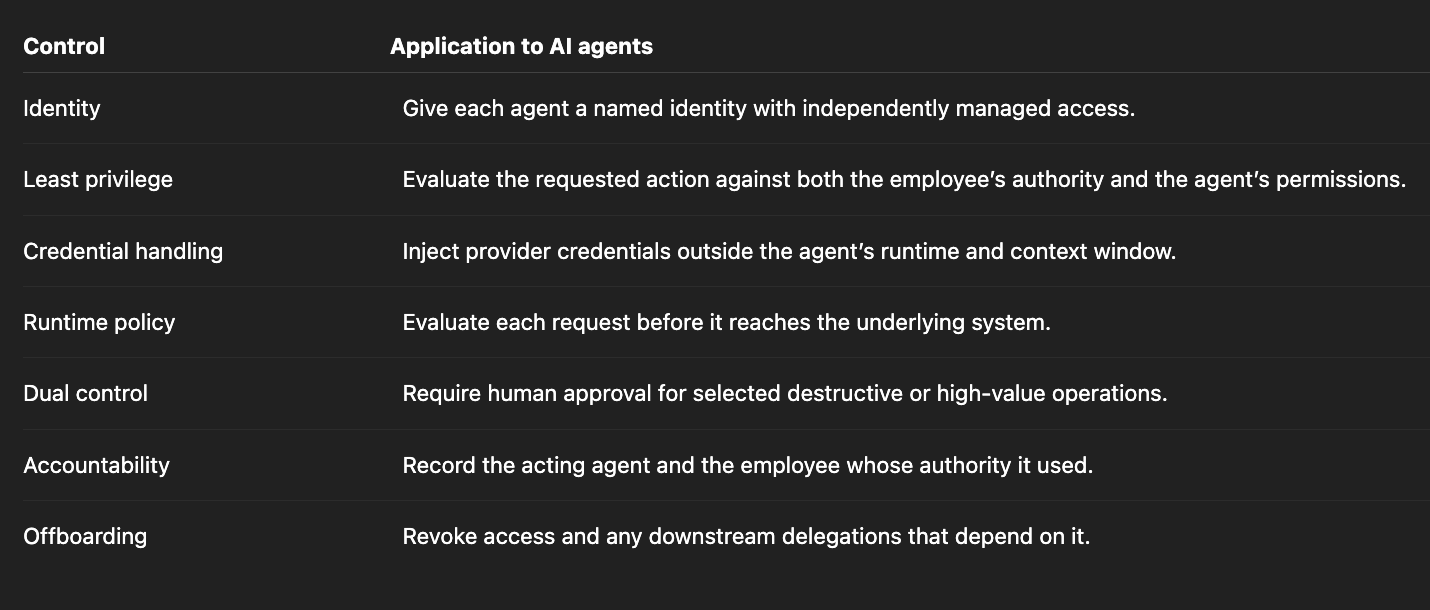
Credential isolation is especially important. If an agent can read a provider token, a compromised workflow may be able to expose or reuse it. Keeping the token outside the agent’s runtime allows the access layer to enforce restrictions before forwarding a request.
Why agents belong in the insider-risk model
An agent does not need malicious intent to cause harm. It can use legitimate access to carry out the wrong instruction.
OWASP identifies Excessive Agency as a risk when AI systems have more functionality, permissions, or autonomy than their tasks require. Its recommendations map directly to privileged access management: limit permissions, act within the authorizing user’s scope, require human approval for high-impact actions, and enforce authorization outside the model on every request. An agent does not need malicious intent to cause harm. It only needs enough access to carry out the wrong instruction.
For agents, five access patterns deserve particular attention.
1. Standing credentials can outlive the task
A broad API key may make an integration easy to launch, but it can leave the agent with access long after the original task ends. If the key carries administrative privileges, the potential damage extends well beyond the intended workflow.
Access needs an owner, a defined scope, and a way to expire or revoke it.
2. The agent chooses its actions at runtime
A fixed automation follows a predefined workflow. An agent can interpret instructions, choose tools, and adapt its next action to the results it receives.
That flexibility is useful, but it makes the gap between available permissions and intended behavior harder to manage with a static entitlement alone.
3. Untrusted content can influence privileged actions
Agents often read emails, tickets, documents, repositories, and tool outputs. Any of those surfaces may contain instructions that conflict with the employee’s intent.
This creates a confused-deputy risk: an attacker attempts to persuade an authorized agent to use its access for an unauthorized purpose. A workflow that combines sensitive data, untrusted input, and external communication deserves particular scrutiny. That combination creates an exfiltration path to evaluate; it does not, by itself, prove that every such agent is exploitable.
Authorization must therefore be enforced outside the model. Instructions such as “do not send sensitive data” cannot substitute for a control that checks the destination and requested operation.
4. Shared credentials obscure who authorized an action
When multiple employees use an agent through one service account, the provider’s logs may show the shared identity without identifying the employee behind the request.
An investigation then has to reconstruct the relationship between the employee, agent, tool call, and provider action. Recording those relationships at request time makes the evidence easier to use.
5. Unused access can remain active
Stopping an agent does not automatically revoke its credentials or delegations.
GitGuardian’s 2025 State of Secrets Sprawl report found 23.8 million secrets exposed in public GitHub repositories during 2024. It also reported that 70% of secrets leaked in 2022 remained active at the time of the report. These findings concern secrets broadly, not only AI-agent credentials, but they illustrate the importance of revocation and lifecycle management. Read GitGuardian’s findings.
Why session controls and secret vaults are not enough
The principles of PAM transfer directly to agents: least privilege, controlled elevation, credential protection, and accountability. The enforcement point needs to match the workflow.
Session recording can help explain what happened during privileged access. An API-driven agent also needs a decision before each sensitive request is executed. A recording cannot retroactively block an unauthorized export or deletion.
A secrets vault protects stored credentials. If a workflow retrieves a broad credential and hands it to the agent, however, the agent may still be able to use that credential outside the intended access path.
Agentic PAM extends these controls with a specific requirement: every mediated request must be authorized in the context of the agent, the delegating employee, and the requested action. Existing PAM and identity products should be evaluated against that requirement rather than assumed to support or lack it based on their category.
How Alter applies this model
Alter separates three things that are often bundled together:
The credential: the provider secret stored in the vault.
The grant: the authorization that binds access to a user, group, system, or agent.
The policy: the restrictions evaluated when that access is used.
In the delegated agent flow, requests pass through Alter’s proxy. The provider credential is injected server-side and is not returned to the agent. The agent authenticates with its own key, which must still be protected. See Alter’s credential and delegation model.
This allows different employees to have different access to the same provider, and the same employee to delegate different permissions to different agents.
There is an important distinction between just-in-time authorization and credential lifetime. Evaluating each request does not necessarily mean issuing a new provider credential for each request. An integration may use a vaulted API key or programmatic access token. Its lifetime and rotation remain separate controls.
Implementing agentic PAM in six steps
Step 1: Give every agent a named identity
Create separate identities for distinct workloads, such as claude-code-mcp, research-bot, and revops-agent. Each should have a clear owner, its own access configuration, and an independent revocation path.
Start with the minimum capabilities required for the task. Protect the agent’s authentication key in the deployment’s secret-management system, and keep it out of source control, prompts, and logs.
A useful operational test is simple: can you disable one agent without interrupting every other agent using the same provider?
Step 2: Vault the provider credential and bind access with a grant
The setup depends on who owns the credential.
Credential modelExampleSetupOperator-managed secretSnowflake token or internal API keyAn operator stores the credential and defines who may use it.User-authorized OAuth connectionGitHub or Google DriveThe employee authorizes the connection through the provider’s consent flow.
For the delegated agent workflow, keep provider credentials outside the agent’s filesystem and runtime. Define grants that reflect the access each principal should receive.
When several grants share an underlying credential, the access layer must enforce their differences. Sharing a credential does not automatically create separate provider-side identities or permissions for each employee.
Step 3: Delegate access to a specific agent
Delegation records which employee authorized which agent to use a grant. It gives that relationship an explicit scope and revocation path.
For example, an employee can authorize a research agent to use a GitHub connection with a grant restricted to GET and HEAD requests. A separate publishing agent can receive a different grant with the additional operations its workflow needs.
In Alter’s delegated flow, grants are proxy-only. Onward delegation is opt-in, child grants can narrow access and shorten their lifetime, and revoking a parent invalidates dependent delegations. See the delegation lifecycle.
The research agent’s attempt to make a disallowed POST request should fail before reaching GitHub. Revoking the publishing agent’s grant should leave the research agent’s independent grant intact.
Method restrictions are useful for this GitHub example, but they are not a universal definition of read-only access. Some APIs use POST for queries, and some allowed reads may still expose sensitive information.
Step 4: Enforce policy in the request path
Policy should answer concrete questions about the operation:
Is this endpoint permitted for this agent?
Are all recipients within an approved domain?
Is the request within the allowed time window and usage limit?
Does this action require a recent sign-in or human approval?
For example, this Alter content_match rule body denies a Gmail send operation when its recipients are not all within the permitted domain:
{
  "match": { "operations": ["gmail.users.messages.send"] },
  "params": [
    {
      "name": "recipients",
      "op": "not_subset_of",
      "value": ["*@acme.com"]
    }
  ],
  "effect": "deny"
}
Alter’s applicable rules combine as restrictions: a denial wins, and one rule cannot widen access granted elsewhere. Its policy tooling also supports simulation so teams can test expected decisions before applying a change. See policy configuration and simulation.
Test both the requests that should succeed and those that must fail. Include malformed inputs, ambiguous parameters, and requests the operation classifier cannot identify. A required authorization decision that cannot be completed should fail closed.
Step 5: Require approval for high-impact actions
Human approval adds a checkpoint where an incorrect action would be costly or difficult to reverse. Examples include deleting production resources, sending sensitive material, changing privileges, or initiating a large payment.
Choose the approval boundary according to the operation’s meaning. Requiring approval for every POST may be too broad for an API that also uses POST for read queries.
The reviewer should see enough context to make a decision: the acting employee and agent, target resource, requested action, and relevant parameters. The execution path should preserve the relationship between the approved request and the action that runs.
Alter supports grant-level approval requirements and conditional approval rules. Read the human-in-the-loop guide.
Step 6: Make audit and revocation operational
For each request, retain enough evidence to answer:
Which agent acted?
Whose authority did it use?
Which grant and provider were involved?
What action was requested, and what was the outcome?
Which application run or tool call produced it?
Denied requests matter too. They can reveal misconfigured workflows, excessive permission requests, or attempted abuse. Avoid turning the audit log into another store of sensitive payloads or credentials. See Alter’s audit documentation.
Then test revocation. Remove a delegation and confirm that the agent’s next request fails. Remove a parent grant and confirm that dependent access fails as well. Offboarding is complete only when the access path has actually stopped working.
Worked example: Claude Code accessing Snowflake
Consider an analyst who wants Claude Code to query Snowflake.
A shared token in an MCP configuration may get the integration working, but it also gives the local process access to a provider credential. If every analyst uses the same Snowflake identity, provider logs alone may not distinguish the employee behind each request.
A mediated workflow separates the agent’s identity from the provider credential and adds employee attribution and policy at the request boundary.
1. Restrict the Snowflake credential
Start with a Snowflake role that has only the privileges required by the integration. A role-restricted programmatic access token might be created with:
ALTER USER analytics_agent ADD PROGRAMMATIC ACCESS TOKEN agent_token
  ROLE_RESTRICTION = 'ANALYST_RO'
  DAYS_TO_EXPIRY = 90;
The user, role, and expiry above are examples. Follow the applicable Snowflake network and authentication policies, and choose a rotation schedule appropriate to the deployment.
This is a stored provider token with a defined lifetime, not a newly minted credential for every query. Alter’s Snowflake integration injects it into the outgoing authorization header. See the Snowflake setup guide.
2. Bind access to the employee and agent
Store the token as a managed secret. Configure the appropriate user grants and authorized delegations to the named claude-code-mcp agent.
Snowflake enforces the privileges of the token’s underlying user and role. Alter adds restrictions and attribution for the employee and agent using the grant. If the integration uses a shared service identity, those permissions must be deliberately mapped; the token does not automatically inherit each analyst’s personal Snowflake roles.
3. Route tool calls through the controlled path
The MCP integration should use the delegated proxy path and carry the authenticated employee context needed to resolve the correct grant. Keep the Snowflake token outside the agent process, and attach useful audit context such as the tool name and run identifier.
An employee identifier supplied by the model is not a substitute for authenticated user context. Similarly, an agent that can reach the same data through an uncontrolled credential has another access path that needs to be addressed.
4. Add policy and test its coverage
Apply agent-specific limits, quotas, and approval requirements on top of Snowflake’s roles. Keep database permissions as the foundation for controlling which data and SQL operations are available.
Do not assume that an HTTP method or a catalog of management endpoints classifies every SQL statement. Test the actual query paths, including batches and other supported execution modes, against the intended restrictions.
The resulting workflow should provide three things: a provider credential the agent cannot read, an enforced scope for each request, and an audit record connecting the analyst to the agent’s action.
Bring agents into the privileged-access program
Agentic PAM makes existing security practices applicable to delegated agent workflows:
Access reviews include agent grants and delegation chains.
Offboarding revokes the access those workflows depend on.
High-impact actions receive explicit approval where required.
Investigations can connect provider activity to both an employee and an agent.
The goal is to let agents do useful work within authority the organization can explain, enforce, and revoke.
Start with one workflow. Name the agent, define whose authority it uses, remove provider credentials from its runtime, and test which actions are allowed. Then verify that the audit trail and revocation path work as expected.
Explore Alter or follow the documentation to build your first delegated workflow.
Frequently asked questions
What is agentic PAM?
Agentic PAM applies privileged access management to AI agents. It evaluates requested actions using the agent’s identity, delegated authority, and applicable policies, while keeping provider credentials outside the agent’s runtime.
How does it relate to non-human identity management?
Non-human identity management covers identities such as workloads and service accounts, including their ownership and lifecycle. Agentic PAM focuses on controlling privileged actions performed by agents, including actions delegated by employees. The capabilities overlap and should work together.
Does it replace an existing PAM platform?
It can extend an existing privileged-access program. Evaluate the controls already available in your environment and identify what is needed for per-request authorization, delegation, credential isolation, and agent attribution.
Why isn’t a scoped API key enough?
A scoped key is useful, but its scope may be broader than a particular task requires. On its own, it may not distinguish the delegating employee, apply parameter-level restrictions, or require approval for a specific action. If the agent can read it, credential exposure remains a concern.
What should happen if authorization cannot be evaluated?
A privileged request should be denied when a required authorization decision cannot be completed. Failure behavior should be tested as part of the integration.
Does agentic PAM prevent prompt injection?
No. It can limit the actions available to a manipulated agent and keep provider credentials out of its reach. A malicious instruction may still cause harm within an overly broad allowed scope, including misuse of data the agent can legitimately read. Narrow permissions, output controls, appropriate approvals, and monitoring remain necessary.